
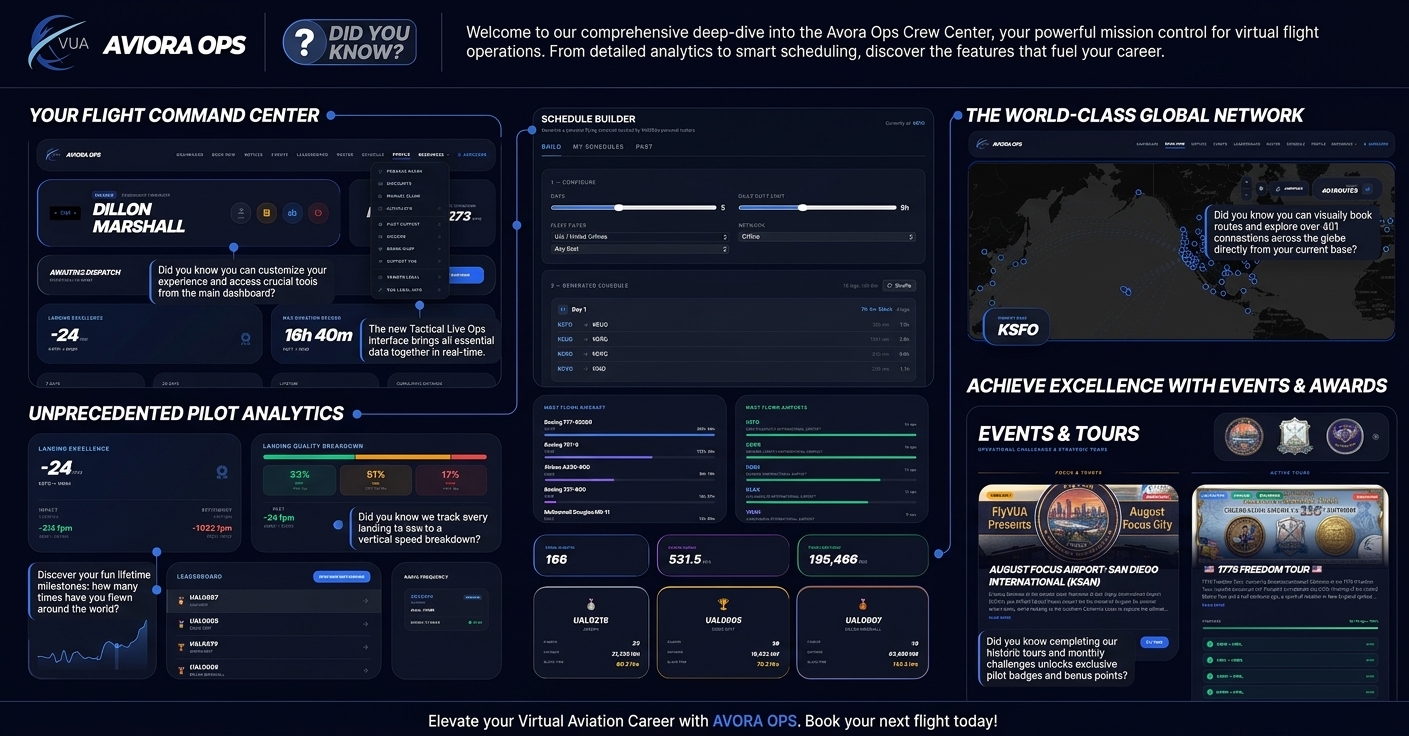
Welcome back to another installment of our Did You Know? series! Today, we are taking a complete, deep-dive tour across every feature of the Aviora Ops Crew Center—VirtualUA’s sleek, dark-mode operational portal designed to give pilots absolute control over their flight career, route planning, and telemetry tracking.
1. Generate Smart Multi-Day Roster Sequences Finding your next route sequence is effortless using the built-in Schedule Builder. Rather than searching for single legs manually, you can fully configure a custom tour:
- Custom Duty Limits: Set your target trip length in days and cap daily duty time (such as a maximum 9-hour duty window).
- Fleet Customization: Filter by United Mainline, United Express, or Star Alliance partner fleets.
- Instant Roster Generation: The system instantly compiles a multi-leg sequence starting right from your current station (such as KSFO).
- One-Click Shuffle: Don’t like the generated route flow? Hit Shuffle to immediately spit out a brand new, valid flying sequence.
2. Visual Flight Booking & Instant Jumpseating Navigating to your next departure airport is completely visual via the Book Now portal:
- Interactive Route Map: Centers directly on your station to show all available connection vectors—giving you immediate visual access to over 401 reachable routes from key hubs.
- Network Integration: Effortlessly switch between mainline routes and partner operations.
- Instant Jumpseat: Position yourself to any airport across the globe in seconds to prepare for events or special group flights.
3. Deep-Dive Flight Telemetry & Route Analysis Every flight logged in your Operational Flight Log stores rich background data. By selecting Analyze on any completed leg, you can inspect:
- Touchdown Metrics: Review your exact vertical speed at touchdown (FPM) alongside real-time landing impact force (G-force).
- Efficiency Scores: View automated flight path efficiency scores calculated against planned route distance.
- Interactive Route Maps: Inspect your rendered flight path alongside full waypoint-by-waypoint routing sequences.
4. Advanced Pilot Profiles & Career Metrics Your personal Profile page tracks far more than standard total hours:
- Landing Quality Breakdown: Displays an exact percentage split across Soft (<200 FPM), Firm (200–400 FPM), and Hard (>400 FPM) landings, along with your all-time best (-24 FPM) and worst touchdown rates.
- By The Numbers Milestones: Track fun lifetime milestones, like how many times your cumulative distance has circled the Earth (12.1×) or covered the distance to the Moon (1.29×).
- Fleet & Hub Operations: View your top-flown aircraft types (led by the Boeing 777-300ER and 787-9) and top visited hubs (KSFO, KEWR, KDEN, KLAX, and VHHH).
5. Global Events, Focus Airports & Award Badges Never miss out on official community challenges under the Eventstab:
- Monthly Focus Airports: Earn extra points by flying into highlighted hubs, such as San Diego International Airport (KSAN).
- Historic Tours: Complete structured, multi-leg tours like the 1776 Freedom Tour to celebrate major milestones.
- Digital Profile Badges: Unlocking tour achievements displays official digital medals directly on your public pilot profile.
6. Live Tactical Ops, NOTAM Bulletins & Community Leaderboards The main dashboard serves as your daily mission control:
- Tactical Live Ops: View real-time transponder activity, active network frequencies, and live airport METAR weather strings.
- Operational Notices: Read high-priority virtual airline NOTAMs and system updates directly in the Notices tab.
- Competitive Rankings: Track live standings on the Monthly Leaderboard across Total Flights, Block Time, and Total Distance, or search through active crew members on the Roster.
Whether you’re aiming for a buttery soft touchdown, hunting for your next event badge, or scheduling a 5-day flying tour, the Aviora Ops Crew Center has everything ready for your next departure.
Log into Aviora Ops at crew.flyvua.org today, generate your next roster, and start climbing the leaderboards!
About the Author